 MKCad
AutoCAD Plant 3D vs CADWorx vs AVEVA E3D: choosing piping design software
Three of the most widely used 3D piping design tools, compared from a designer's seat: platform, project size, licensing, learning curve and who each one actually suits.
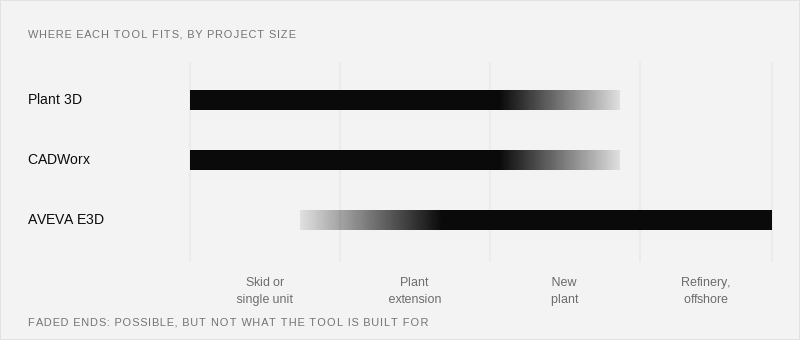
If you design piping, sooner or later someone asks which software the team should use. Three names come up most often: AutoCAD Plant 3D, CADWorx and AVEVA E3D. All three can produce a good plant model and good isometrics. The differences are in what they are built on, how big a project they are designed for, and what they cost to run.
This is a designer's comparison, not a vendor brochure. I work in Plant 3D every day, so read it with that in mind.
The short version
| AutoCAD Plant 3D | CADWorx | AVEVA E3D | |
|---|---|---|---|
| Built on | AutoCAD | AutoCAD or BricsCAD | Its own platform |
| Typical projects | Small to large | Small to large | Large, multi-discipline |
| Data model | Project database behind DWG files | Spec-driven, DWG-based | Central multi-user database |
| Learning curve | Short for AutoCAD users | Short for AutoCAD users | Long |
| Licensing | Part of an AutoCAD subscription | Separate licence | Enterprise licensing |
Day to day
| AutoCAD Plant 3D | CADWorx | AVEVA E3D | |
|---|---|---|---|
| Who looks after the setup | A CAD lead | A CAD lead | Dedicated administrators |
| P&ID | In the same product | A separate P&ID product | A separate diagrams product |
| Pipe stress | Export to stress software, e.g. as PCF | Close link to CAESAR II | Links to stress software |
| Finding designers | Large pool of AutoCAD users | Smaller pool | Specialists, mostly from large projects |
AutoCAD Plant 3D
Plant 3D runs inside AutoCAD and is included with an AutoCAD subscription as one of its specialised toolsets. For a company that already pays for AutoCAD, that changes the economics completely: the piping tool is already there.
Strengths: familiar AutoCAD environment, spec-driven routing, P&ID and 3D in one product, automatic isometrics and orthographic drawings, and a project database you can read and edit through Data Manager. Collaboration across offices is possible through Autodesk's cloud services.
Weaknesses: very large models become heavy, multi-discipline coordination usually happens in Navisworks rather than in Plant 3D itself, and some everyday tasks (clash checking, working inside dense areas) need either extra tools or workarounds.
Best for: EPC contractors, engineering offices and fabricators of almost any size, especially teams already on AutoCAD.
CADWorx
CADWorx, from Hexagon, also runs on a familiar CAD platform, and it is closely tied to Hexagon's analysis tools, notably CAESAR II for pipe stress. Teams that do a lot of stress analysis often value that link.
Strengths: spec-driven piping on a well-known platform, strong stress-analysis workflow, long history in the industry.
Weaknesses: a separate licence on top of the CAD platform, and a smaller pool of designers who know it compared to AutoCAD.
Best for: companies already in the Hexagon ecosystem or with a heavy stress-analysis workload.
AVEVA E3D
E3D is built for the largest projects: refineries, offshore platforms, plants with many disciplines modelling at once in one central database. It is a different class of tool, with administration and licensing to match.
Strengths: scale, true multi-user concurrent work, deep multi-discipline integration, and the data management large owner-operators expect.
Weaknesses: cost, a long learning curve, and the need for dedicated administrators. For a small office or a mid-size project it is usually more system than the job needs.
Best for: major EPCs and owner-operators on very large projects, often where the client specifies it.
How to choose
Ask three questions:
- What does the client require? On big projects, the decision is often made for you.
- How big are your projects, and how many people model at once? Plant 3D and CADWorx cover most projects; E3D is designed for the largest.
- What does the team already know? Retraining a team is a real cost, and AutoCAD skills are the most common in the market.
Put as a decision, it usually comes down to this:
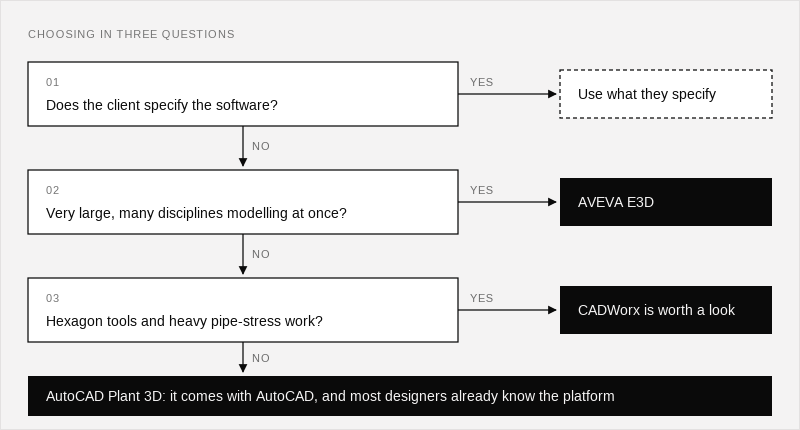
For most small and mid-size engineering offices, Plant 3D is the pragmatic choice, especially since it comes with AutoCAD. Its gaps are real but specific, and they can be closed: the MK Clash + MK Clipper bundle covers clash checking and working in dense models, and the Foundations course gets a team productive quickly.